Data logging: run log
The midas logger (mlogger) can record a short summary of each run that is taken. As well as recording the run number and start/end time, it can record any ODB keys you wish, and save them to a text file or MySQL database. Text files can be either plain text (ASCII) or structured (JSON).
The runlog may be used as a simple "logbook" of data that has been taken, but most experiments supplement it (e.g. with an elog, shared Google Doc, or custom database) so they can record extra information such as notes from shifters.
Alternatives
The runlog is designed to record a few important ODB keys for each run. You can also:
- record the full ODB content of each run as a JSON file
- run a custom script at the start/end of each run
- process each midas file that gets written
- write a custom program that registers a transition handler
What to log
Configuration of the runlog is done in the /Logger/Runlog directory. There is a subdirectory for each destination (ASCII, JSON and SQL), and configuration of where the data gets logged is explained below.
All three use the same way to configure what gets logged:
/Logger/Runlog/xxx/Links BORshould contain symlinks to keys that get recorded at the start of each run/Logger/Runlog/xxx/Links EORshould contain symlinks to keys that get recorded at the end of each run
By default we record the run number and start time at the beginning of each run, and the stop time at the end of each run. Note that all the destinations use the name of the link (rather than the name of the target) when saving the data.
Restrictions on what can be logged
There are some restrictions on what each destination can handle:
| Runlog destination | Sub-directories | 64-bit integers | Arrays |
|---|---|---|---|
| ASCII |  |
First element only | |
| JSON | |
|
|
| SQL | First element only |
You can also add entries directly in the Links BOR / Links EOR directories, but in the vast majority of cases experiments what to create symlinks to entries that exist elsewhere in the ODB.
Where to log
Note that entries only get added to the runlog if:
- The
mloggerprogram is running - AND
/Logger/Write datais true - AND the relevant
/Logger/Runlog/xxx/Write datais true - AND the relevant
/Logger/Runlog/xxxhas been configured, as explained in this section
The ODB key /Logger/Runlog/ASCII/Filename specifies the file to write to. All runs are logged in the same file.
- If the filename contains a
/character, it will be treated as a full filepath. - If it doesn't contain a
/, it will be written relative to the directory specified in/Logger/Message dir. Note there is no fallback option - if/Logger/Message diris empty, no file will be written!
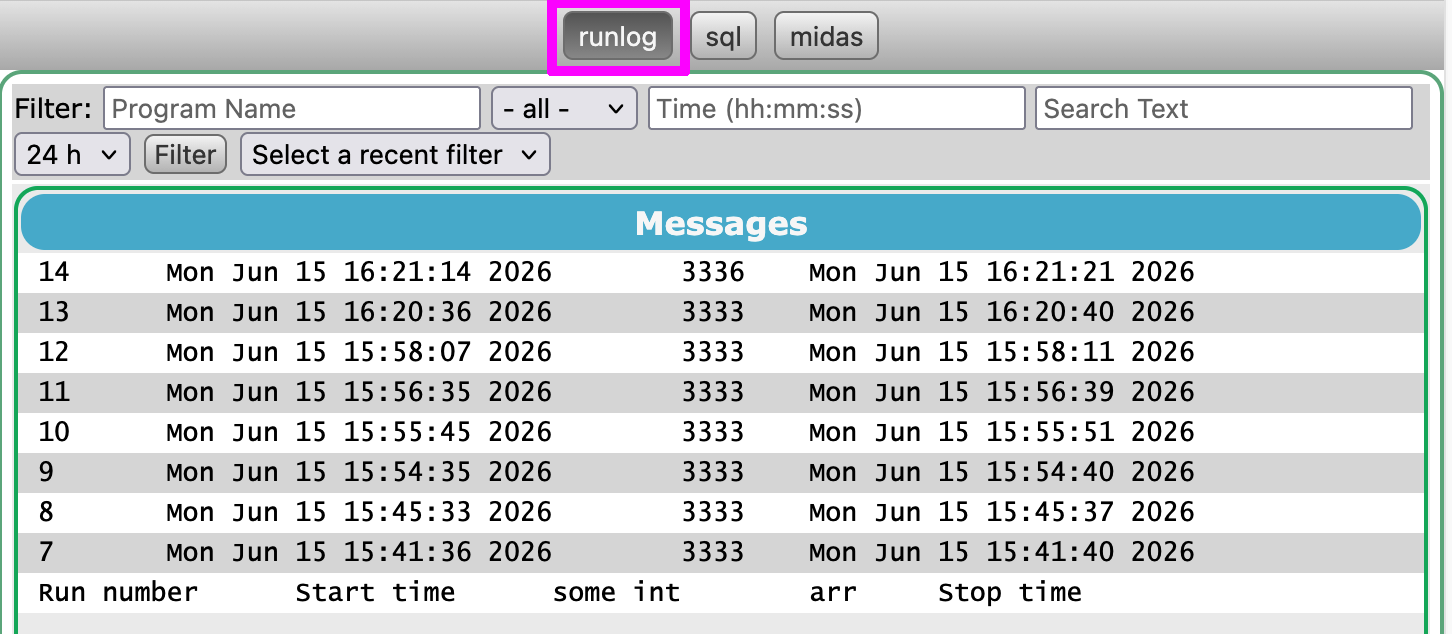 Note that any file with the
 .log extension that is found in the messages directory will be visible on the messages webpage. If you leave the filename as the default runlog.log, you will see a runlog button at the top of the messages webpage.
The ODB key /Logger/Runlog/JSON/Subdir specifies a directory to write JSON files in. A new file is created for each run, which contains both the begin-of-run and end-of-run data.
The subdirectory is relative to the first of these that isn't empty:
/Logger/Message dir/Logger/Data dir
The SQL runlog only supports MySQL databases. It uses a different way to specify the connection details compared to the history database. You can write to the same database as the history if you wish, but you must ensure that your table name for the runlog does not clash with any tables that the history system will create (which are based on the equipment and "virtual event" names - see History file formats and database schema for more).
The connection details are specified by the following keys in /Logger/Runlog/SQL, which are self-explanatory: Hostname, Username, Password, Database. The user must have permissions to create and alter tables in the specified database.
If the key Create database is true, and the database does not already exist, the database will be created automatically. In that case the user must also have permission to create databases.
A single table is used to record all runs - specify it using the Table key. It will be created automatically if needed.
You can specify a logfile for debugging, in which all SQL statements will be recorded. The Logfile is relative to the first of these that isn't empty:
/Logger/Data dir- The experiment directory
Output format
The ASCII runlog file contains tab-separated data. The first line contains the field names, and subsequent lines contain a single line per run.
Example ASCII runlog file
Run number  Start time  Stop time
1  Mon Jun 15 15:25:42 2026  Mon Jun 15 15:25:46 2026
3  Mon Jun 15 15:34:54 2026  Mon Jun 15 15:34:58 2026
Some subtleties are:
- If you add or remove entries from
Links BORorLinks EOR, the header line does NOT get updated. It is recommended that you start a new runlog file if you change which data is being recorded. - Subdirectories are not supported and get printed as
<unknown>. - Only the first element of an array will get recorded.
- Booleans are recorded as
y/nfor true/false.
A new file is created for each run, with names like runlog_000001.json for run 1. The begin-of-run and end-of-run data is recorded in keys named BOR and EOR, respectively. Subdirectories and arrays are fully supported.
Example JSON runlog file
{
  "BOR": {
    "Run number" : 1,
    "Start time" : "Mon Jun 15 15:25:42 2026"
  },
  "EOR": {
    "Stop time" : "Mon Jun 15 15:25:46 2026"
  }
}
The MySQL table will contain one column for each entry in Links BOR and Links EOR. The column name exactly matches the link name (e.g. Run number does NOT get manipulated to run_number or similar).
The table structure can adapt as links are added/removed. Columns are never dropped from the table; if you remove a link from Links BOR, the relevant column will just contain NULL for subsequent runs.
Example SQL runlog
In this example, the arr link was present for runs 10-14, and the arr2 link was present run runs 15+.
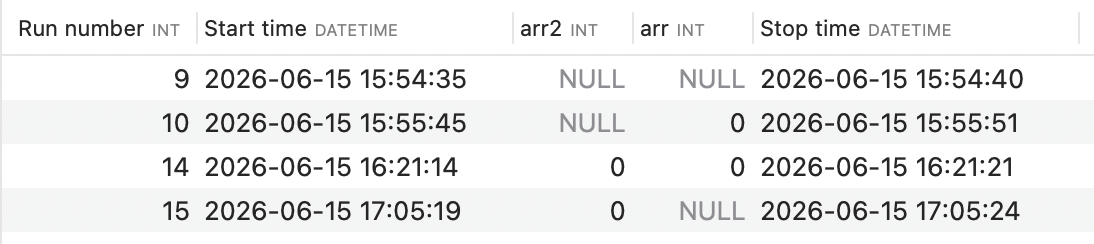
Some subtleties are:
- The first column is used as a primary key. It is HIGHLY recommended that you keep the first entry in
/Logger/SQL/Links BORas the run number! - If an ODB string looks like a date/time (e.g.
Mon Jun 15 15:25:42 2026), the SQL column will beDATETIMErather than a simpleVARCHAR. - If you use the same link name in both
Links BORandLinks EOR, only a single column will be created. The BOR value will be overwritten at the end of the run. - Columns are ordered based on the order in the ODB, with BOR columns before EOR columns.