Runs: configuring
This page covers how to customise what happens at run transitions.
For the concepts and day-to-day use, see Runs: overview.
Doing work during run transitions
All midas programs can perform actions when a run is started/stopped/paused/resumed. See Runs: programming for details.
It is also possible to run a custom script when the run starts or stops. To implement this, you can create the ODB keys:
/Programs/Execute on start run/Programs/Execute on stop run/Programs/Execute on start abort
These can be set to call any script or command on your host machine. The Execute on start abort script gets called if we try to start a run, but a program reports that there is a problem that should prevent the run from actually starting.
A common use for this system is to log some key information in a "runlog" database, without having to write a full midas program that is always running.
Deferred transitions
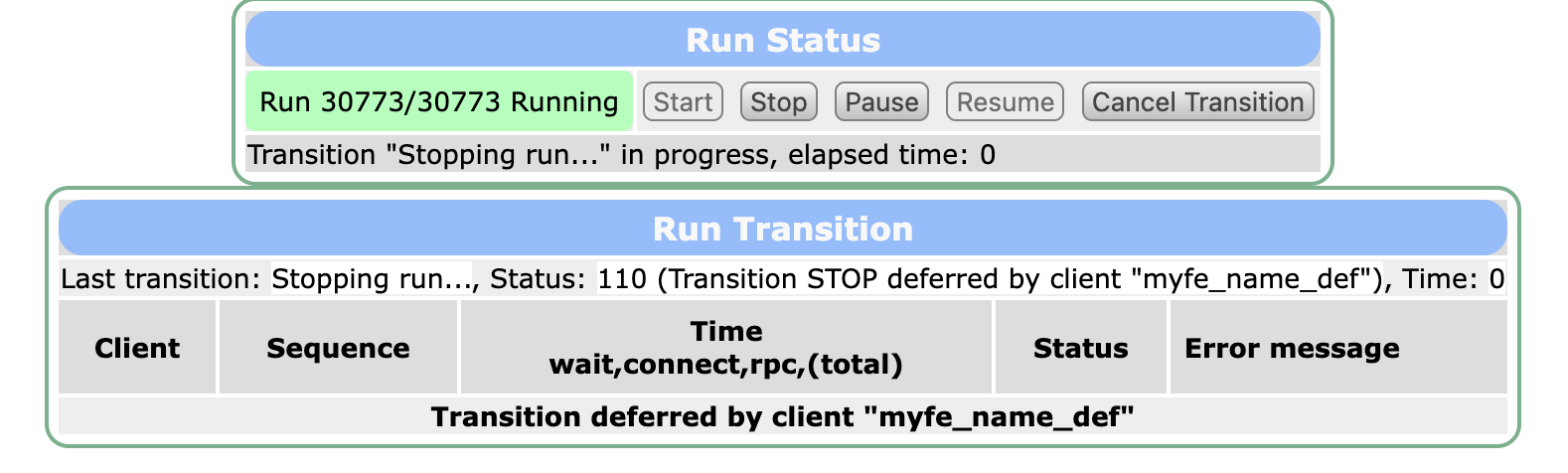
Clients can register a "deferred transition" so that they can do more work before the transition actually happens.
An example use case is to take some extra "calibration" data at the end of a run. So when the user clicks the "Stop" button, your experiment could enable a calibration system, acquire a set number of events, and then actually allow the run to stop.
When a transition is being deferred, the Transition webpage shows a message indicating what is happening:
Preventing a run from starting
Any program can run its own logic and prevent a run transition from happening.
There are also 2 extra checks that can be enabled by setting flags in the ODB to y:
/Experiment/Prevent start on alarmswill prevent a run from starting if any alarms are currently triggered/Experiment/Prevent start on required progswill prevent a run from starting if any program that has been marked as required is not currently running
These checks are very useful for minimising the amount of data taken while the experiment is clearly in a sub-optimal state.
Asking questions when the run starts (edit on start)
You can ask the user to answer questions when they are starting a run. This is useful for
- verifying critical settings, such as whether data should be written to disk or not
- creating a simple interface for parameters that are changed often, without having to write a custom webpage or having the user find the correct setting in the ODB
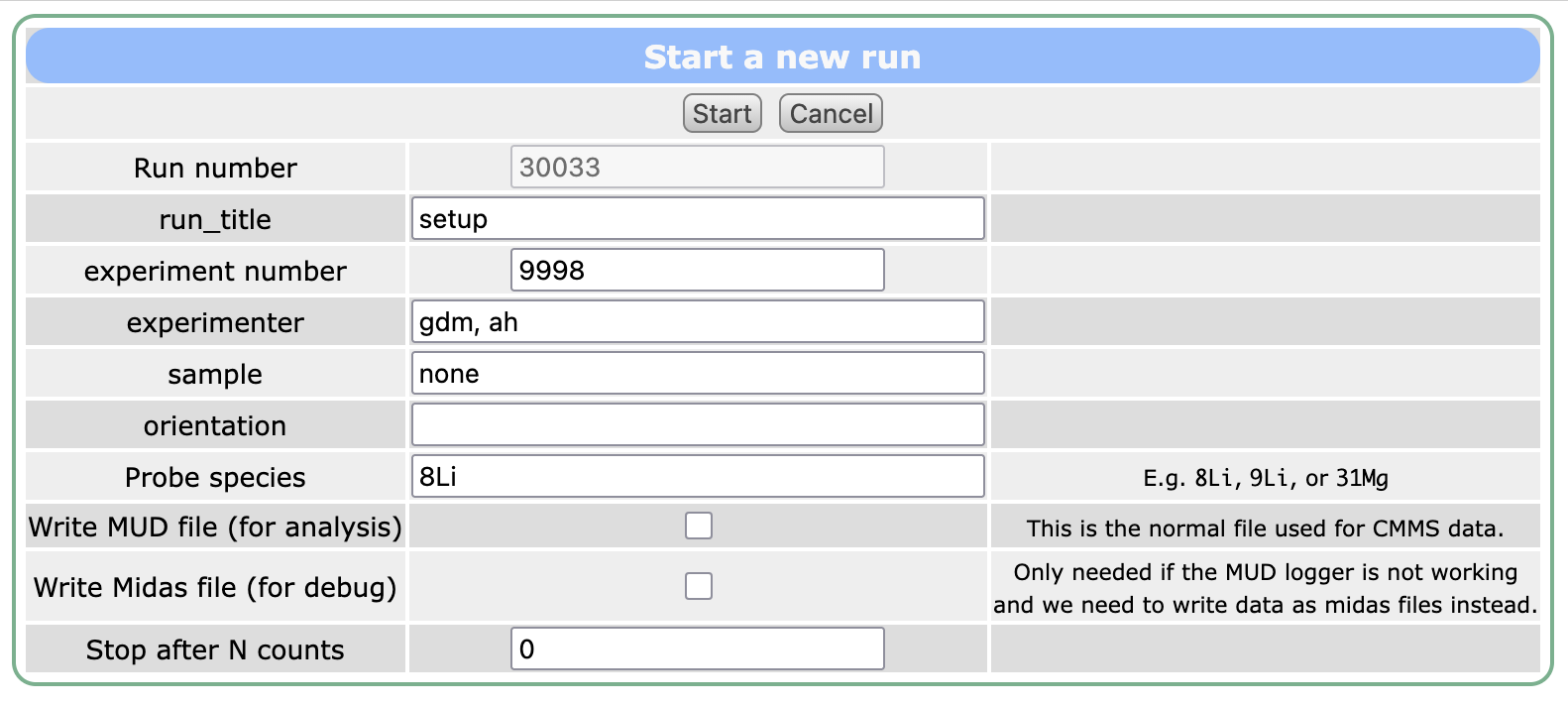
You can enable this by creating the ODB directory /Experiment/Edit on start. In there, you can either add new keys or create links to other keys in the ODB. For example, to show a checkbox asking whether to write data to disk, you could create a link to /Logger/Write data. You could do this either using the web interface, or the odbedit command-line tool:
odbedit -c 'mkdir "/Experiment/Edit on start"'
odbedit -c 'ln "/Logger/Write data" "/Experiment/Edit on start/Write data"'
Adding help text
You can specify help text (aka parameter comments) for each question by creating the ODB directory /Experiment/Parameter comments. Add keys (of type "string") with the same name as the variable in the "Edit on start" directory. Again, you can this using either the web interface or the odbedit command-line tool:
odbedit -c 'mkdir "/Experiment/Parameter comments"'
odbedit -c 'create string "/Experiment/Parameter comments/Write data"'
odbedit -c 'set "/Experiment/Parameter comments/Write data" "Write data to disk?"'
Parameter comments for links
If you want to provide a comment for an "edit on start" parameter that is a link, you must use the name of the link itself, not the name of its target. For example:
- If the link name is
/Experiment/Edit on start/Write midas file - ... and the link target is
/Logger/Write data - ... the comment should be in
/Experiment/Parameter comments/Write midas file, NOT.../Write data
Parameter comments may include HTML. For example, you could highlight a comment in red by setting the comment to:
<span style="color:red">Write data to disk?</span>
Preventing the user from editing the run number
You can create the special ODB key /Experiment/Edit on start/Edit run number as a boolean. If you set this to n, then the run number will not be editable from the "start run" web interface, and will automatically increment by 1.
Note that this does not prevent any code from editing the run number, or prevent users from directly editing the run number in /Runinfo/Run number. It is purely a convenience to limit the options available on the "start run" interface.
When the questions get asked
The questions are shown when users start a run using the web interface or using the odbedit start command.
They are NOT shown when a run is started automatically by code, by the sequencer, or using the odbedit start now command.