Sequencer: scripting
This page covers writing sequencer scripts.
For the concepts and day-to-day use, see Sequencer: overview.
General script structure
MSL
The midas Scripting Language (MSL) is used with msequencer. It is a custom language that supports ODB access, starting/stopping runs, loops, conditionals and more. See the full MSL syntax section for details. You can define libraries of useful functions, and include them in other scripts.
Example MSL script
COMMENT "This is a MSL test file"
RUNDESCRIPTION "Test run"
PARAM runs

LOOP $runs
     TRANSITION START
     WAIT Seconds, 60
     TRANSITION STOP
ENDLOOP
Python
PySequencer will look for three specific functions in your file:
define_params(seq)- optionalsequence(seq)- requiredat_exit(seq)- optional
These are described in more detail below. All three should accept one argument, which is a midas.sequencer.SequenceClient object (a SequenceClient is like a regular MidasClient, but with extra sequencer-specific functions available). This object is also available as a global variable within your script (e.g. if you want to define helper functions and don't want to pass the seq object to each of them).
Your file may import any other modules, and you can define/call your own functions. See Reloading modules for what happens to those modules when you edit and reload your script.
Example Python script
# This is a PySequencer test file

def define_params(seq):
    seq.register_param("runs", "Number of runs", 3)

def sequence(seq):
    runs = seq.get_param("runs")

    for r in seq.range(runs):
        seq.start_run()
        seq.wait_seconds(60)
        seq.stop_run()
Defining parameters
You may create "parameters" that the user will be prompted for when they start the sequence. For each parameter, you specify a name, a comment that will be shown in the prompt dialog, a default value, and optionally a list of acceptable values.
In MSL, you use the PARAM command to define parameters.
You can also create the ODB directory /Experiment/Edit on sequence and add parameters there. These are common to all sequencer scripts.
PARAM name, comment, [default], [a,b,c | bool]
PARAM x, "param with default", 3
PARAM x, "param with options", 3, 4,5,6
PARAM x, "bool with default", true, bool
The default of a bool parameter must be 1, true or TRUE for true. Any other value (including y) means false.
In Python, you define the define_params(seq) function, and call seq.register_param() within it.
The "default value" you provide determines the type of the variable in the ODB. If you specify a string it will be a TID_STRING, an integer will become TID_INT32 etc.
def define_params(seq):
    # Will be stored as an integer
    seq.register_param("runs", "Number of runs", 3)

    # Will be stored as a float
    seq.register_param("voltage", "PMT voltage", 1342.7)

    # Will be stored as a string, and user will see a dropdown to choose from
    seq.register_param("run type", "Purpose of this run", "normal", ["normal", "calibration", "testing"])
Main script
Structure
In MSL, each command occupies one line. Execution proceeds as one would expect from a natural language syntax.
PARAM runs

LOOP $runs
     TRANSITION START
     WAIT Seconds, 60
     TRANSITION STOP
ENDLOOP
In Python you MUST define the sequence(seq) function, and this is the main script that will get executed. You may call/define your own functions as well, and also call functions from other modules.
There are a few "best practices" to consider to maximise integration with the webpage:
- Use
seq.wait_seconds()instead oftime.sleep()so you get a progress bar on the webpage.seq.sleep()is an alias forseq.wait_seconds()if you prefer. - In a normal "for" loop use
seq.range()instead ofrange()so you get a progress bar on the webpage. We don't have a way to show progress through any other type of for/while loop - Avoid any very long-lasting calls (e.g. blocking on a socket) as these may prevent us from being able to stop the sequence when the user calls the "Stop immediately" command. Better to poll in a loop until a condition is met.
def sequence(seq):
  runs = seq.get_param("runs")

  for r in seq.range(runs):
      seq.start_run()
      seq.wait_seconds(60)
      seq.stop_run()
Reading parameters
The $param_name syntax will automatically be substituted with the parameter value.
Assuming a parameter was defined like PARAM runs, you can get the value with:
$runs
You can call get_param() to get the value of a parameter:
runs = seq.get_param("runs")
Waiting with a timeout
Scripts often wait for something to happen, e.g. for a high voltage to reach its set point. If it might never happen, give the wait a timeout so the script doesn't wait forever. While such a wait is running, the sequencer page shows how many seconds of the timeout have passed.
WAIT ODBValue takes an optional timeout in seconds after the word timeout. After it, you can name a variable that is set to 1 if the condition was met, or 0 if the timeout expired:
WAIT ODBValue, /Equipment/HV/Variables/Measured[3], >, 1990, timeout, 60, hv_ok
IF ($hv_ok == 0)
   MESSAGE "HV did not reach 1990 V within 60 s", 1
   EXIT
ENDIF
When the timeout expires, the script carries on with the next line, and a message is written to the message log. Only WAIT ODBValue has a timeout.
wait_odb(), wait_events() and wait_func() take an optional timeout_secs. If the condition isn't met in time, they raise a midas.WaitTimeoutExpired exception:
import midas

def sequence(seq):
    try:
        seq.wait_odb("/Equipment/HV/Variables/Measured[3]", ">", 1990, timeout_secs=60)
    except midas.WaitTimeoutExpired:
        seq.sequencer_msg("HV did not reach 1990 V within 60 s", wait=True)
        return
If you don't catch the exception, the script stops with an error, and at_exit() still runs. wait_clients_running() always has a timeout (10 s unless you give timeout_secs).
Messages
There are two different types of messages in the sequencer.
Regular messages
Regular midas messages get written to the message log.
MSG "Hello"
seq.msg("Hello")
Sequencer-specific messages
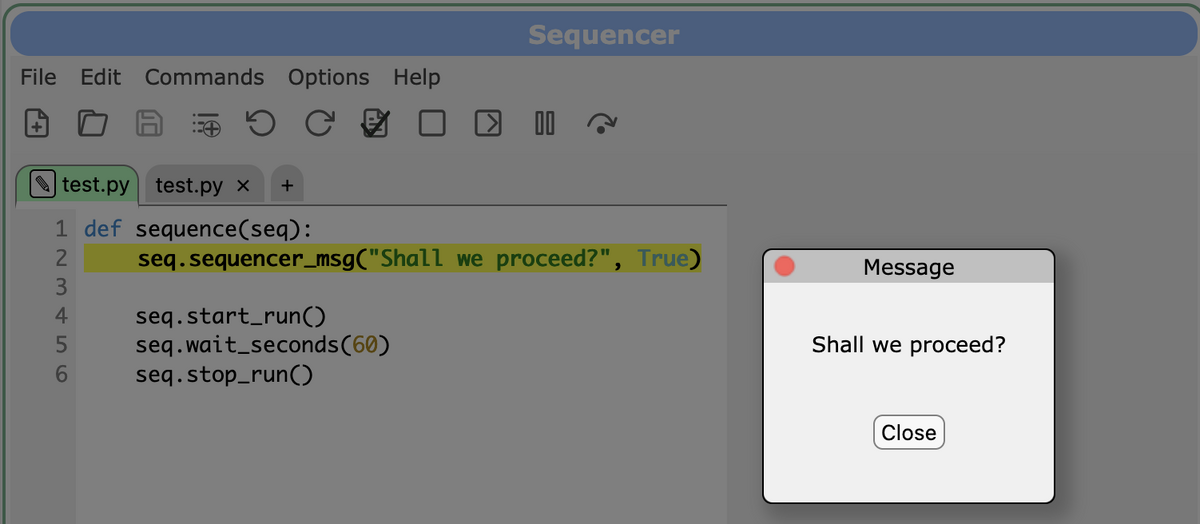
Sequencer-specific messages show up as a dialog box on the sequencer webpage.
MESSAGE "Hello"
MESSAGE "Hello", 1
seq.sequencer_msg("Hello")
seq.sequencer_msg("Hello", wait=True)
The second option in these examples include the "wait" parameter. When this is set, the sequence will not continue until the user has clicked the "Close" button on the webpage to acknowledge the message.
Doing work when the script ends
Sometimes it is necessary to execute some "cleanup" code when stopping a sequence. This could be resetting some actual hardware, or just stopping the current run. For that purpose, a special "atexit" logic is available in both sequencers.
Warning
Note that this is not bulletproof and should not be relied on for safety-critical items! Examples of situations where ATEXIT/at_exit() will NOT be called include:
msequencer/sequencer.pybeing killed by a user (Ctrl-C etc) or the OS (out-of-memory killer, rebooting etc)- (in python) the user's
sequence()function corrupting the python interpreter so badly that it affects the main thread - (in python) the user's
sequence()function entering an uninterruptible state where "Stop immediately" can't actually stop anything (e.g. a blocking wait on a socket) - unidentified bugs in
msequencer/sequencer.py
SUBROUTINE ATEXIT
    COMMENT do what ever you need to do
ENDSUBROUTINE
def at_exit(seq):
    # Do what ever you need to do
    pass
Specific notes about PySequencer
Logging
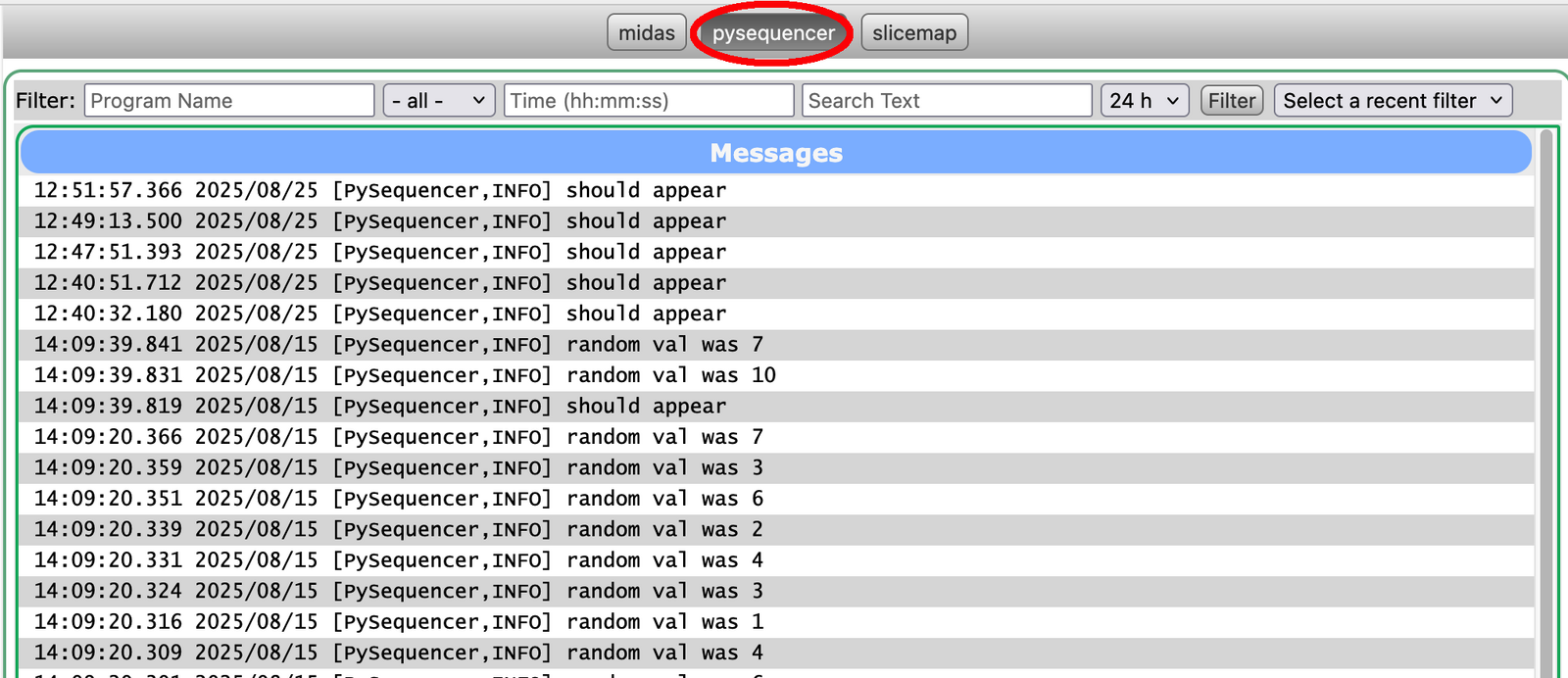
PySequencer is integrated with the python logging module. You may use the global logger variable to log your own info/debug messages. You can configure what happens to these logger messages using either command-line arguments or functions in the seq object.
To print logger.debug() messages, you can pass the --verbose command-line flag and/or call seq.set_py_logger_debug(True) in your script. The default is to only print info() messages or higher.
You can also copy messages to the regular midas message log (so you can call logger.info() instead of seq.msg(), and still have messages appear in the midas message log). The "facility" in this case is "pysequencer". You can enable this functionality using the --log-to-midas command-line flag and/or by calling seq.set_py_logger_to_midas(True) in your script. This is most useful for experiments where terminal access is very limited, and you wish to debug/monitor everything via log files that are visible through webpages.
Variables shown on webpage
For PySequencer, the "variables" table on the webpage will display only local/global variables of the types: int, float, string, bool, numpy.number and numpy.bool. It will also display lists and numpy.ndarrays of those types. It does not display any other types (e.g. datetime.datetime, custom objects, dicts etc). We also don't show any variables where the name starts with a double underscore.
No callback functions
For PySequencer, your script cannot use any of the callback-based functions present in MidasClient. This includes odb_watch(), register_jrpc_callback(), register_brpc_callback(), register_message_callback(), register_transition_callback(), register_disconnect_callback() and communicate(). This is because your script runs in a separate thread, but the main thread is the one responsible for talking to midas; any callbacks get executed in the context of the main thread, not your script's thread.
If you want to check whether an ODB value has changed, you'll need to implement a loop and call odb_get() repeatedly.
You MAY use register_event_request() if you want to look at data as part of your script, as you then call receive_event() to explicitly look at the events, rather than relying on a callback function.
No tracing in other modules
For PySequencer, it is expected that experiments will build a library/module of helper functions to automate certain tasks (e.g. move_calibration_source(x, y)). Your sequencer script can import such a module and call the functions, but the webpage will not show what is happening within that module - it would just show that we're in move_calibration_source().
It is technically possible to enhance the PySequencer logic to trace within these modules, but it is not yet clear whether users want such a feature, and what the best user interface would be.
Reloading modules
If you edit the content of your script, you can reload it using the web interface or by setting the ODB parameter /PySequencer/Command/Load new file to true.
When PySequencer loads a script, it also reloads all the modules that the script uses. This means that if you make changes to a custom module that contains helper functions, you can pick up the new definitions just by reloading your main script. Modules that were already loaded when PySequencer itself started (such as the midas package) are not reloaded.
You can exclude specific modules from being reloaded by calling seq.keep_modules_when_reloading_script() in your define_params() or sequence() function. You might want to do this if:
- A module can only be imported once per python process. This is common for modules implemented in Rust (using PyO3), which fail with a message like
ImportError: PyO3 modules compiled for CPython 3.8 or older may only be initialized once per interpreter process. For example, thesshtunnelpackage usesparamiko, which uses the Rust bindings in thecryptographypackage. - A module is slow to import, and you don't change it, so reloading it just slows down loading your script.
- A module keeps state at module level (e.g. an open connection or a cache) that you want to survive when the script is reloaded.
You can pass a module name, a compiled regular expression, or a list of either:
import re

def define_params(seq):
    # Keep a single module
    seq.keep_modules_when_reloading_script("cryptography.hazmat.bindings._rust")

    # Keep numpy.random and all of its submodules, plus bisect
    seq.keep_modules_when_reloading_script([re.compile(r"numpy\.random.*"), "bisect"])
Example scripts
Full details of the syntax are in Full MSL syntax and Full Python syntax below, but a couple of basic examples are shown here:
COMMENT "This is a MSL test file"
RUNDESCRIPTION "Test run"
PARAM runs

LOOP $runs
     TRANSITION START
     WAIT Seconds, 60
     TRANSITION STOP
ENDLOOP
# This is a PySequencer test file

def define_params(seq):
    seq.register_param("runs", "Number of runs", 3)

def sequence(seq):
    runs = seq.get_param("runs")

    for r in seq.range(runs):
        seq.start_run()
        seq.wait_seconds(60)
        seq.stop_run()
Full MSL syntax
Variable names are indicated in italic, options are enclosed in [brackets].
- INCLUDE name
- Include another MSL file name.msl
- BREAK
- Break (finish prematurely) a loop. This is usually used together with an IF statement to abort a loop like
LOOP 10 IF ($x > 0) BREAK ENDIF ENDLOOP - CALL name, a, b, c, ...
- Call a subroutine. Optional parameters a,b,c... are passed to the subroutine, where they can be referenced via
$1,$2,$3, etc. The subroutine can either reside in the current file, or in a library file which is included. - CAT name, a, b, c, ...
-
Concatenates the strings a,b,c,... into a single variable name. Can be referenced with $name. If a string must contain a comma, it can be enclosed in quotes such as in
CAT title, $run, ", ", $n_events - COMMENT comment
- A comment for this XML file, for information only. This comment is shown in the title bar next to the file name if one runs a script. This can be helpful if one has many XML files and the file name only is not enough to supply enough information.
- EXIT
- Exit script immediately
- GOTO n
- Jump to line n in script
- IF (con) ... ENDIF
- Statements between "IF" and "ENDIF" are only executed if condition "con" is true, otherwise the statements between the optional "ELSE" and "ENDIF" are executed. The condition can use any math expression using variables via $name together with operators
<,<=,>,>=,==,!=,&(bitwise AND). Up to four nested IF statements are possible. An example IF statement is:IF ($x+3 > $y*4+$z^2) ... ELSE ... ENDIF - LIBRARY name
- Indicates that the current file is a library (which can be included by other files). A library usually consists of a set of subroutines.
- LOOP [name ,] n ... ENDLOOP
- To execute a loop n times. For infinite loops, "infinite" can be specified as n. Optionally, the loop variable running from 1...n can be accessed inside the loop via $name.
- LOOP name, a, b, c, ... ... ENDLOOP
- Loop though a list of values. The loop is executed once for each value, which is stored into the variable name so it can be accessed inside the loop via $name.
- MESSAGE message [,1]
- Opens a message box in the browser containing the text message. If wait="1", then the sequencer waits until the box is closed by the user before continuing.
- MSG message [, type]
- Produces a midas message going into the message buffer. The optional type can be any of
ERROR,INFO,DEBUG,LOG,TALK. If no type is given,INFOis used. - ODBCREATE path, type [, size]
- Create an ODB key of type type and optional size size (for arrays). type can be
UINT8,INT8,UINT16,INT16,UINT32,INT32,BOOL,FLOAT,DOUBLE,STRING - ODBDELETE path
- Delete an ODB key. If path points to a ODB subdirectory, delete the whole subdirectory.
- ODBGET path, name
- To get a value from a variable name. The variable can then be referenced with $name. If the ODB value is an array, the index can be specified like via a constant or expression:
ODBGET "/Path/key[15]", v ODBGET "/Path/key[$i + 15]", v - ODBINC path [, delta]
- To increment a value in the ODB. delta can be positive or negative. If no "delta" is given, 1 is used.
- ODBLOOKUP path, string, name
-
Lookup a string in a string array in the ODB given by path and return its index in name.
For example, if we have an array
/Examples/Names
    [0] Hello
    [1] Test
    [2] Other
and do
ODBLOOKUP "/Examples/Names", "Test", indexwe get a index equal 1. If a value is not found, the resulting index is set to "not found" which can be tested. If the ODB key does not exist, the sequencer aborts.
- ODBSET path, value [, 01]
-
To set a value in the ODB. value can be any math expression containing variables (preceded by a
$). path can also contain variables (preceded by a$), but no math expressions.If the ODB key referenced by path is an array, the index can be specified such as
ODBSET "/Path/value[3]", 1     # individual value
ODBSET "/Path/value[3-5]", 2   # index range 3,4,5
ODBSET "/Path/value[*]", 0     # all values of array
The path value can match multiple keys using the '?' and '*' wildcard (one or any number of characters respectively). This is useful to set the same sub-path on multiple folders:
ODBSET "/Path/to/somewhere/folder0/value", "1"
ODBSET "/Path/to/somewhere/folder1/value", "1"
ODBSET "/Path/to/somewhere/folder2/value", "1"
can be shortened as:
ODBSET "/Path/to/somewhere/folder*/value", "1"The notify flag specifies if possible hot-links to this ODB value are notified. This can be useful if a front-end program has many parameters, which must be set for a specific run. The front-end usually has a hot-link to its parameters, so on each modification a callback function in the front-end is called which usually modifies some hardware. If there are many ODBSet statements for all parameters, the callback would be executed on each ODBSet, so the hardware would be reconfigured many times slowing down the startup of a run. In order to prevent this, notify="0" can be specified for all ODBSet statements except the last one which contains notify="1", so the callback function is called only once at the end.
- ODBLOAD file [, path]
-
Load an external file into the ODB. JSON, XML and ODB file format are supported with the value inferred by the content of the file. The optional path marks the position where to load the given file into the ODB, if no position is given the file is loaded from ODB root.
For the input file several options are supported: if the filename starts with
/it is assumed to be an absolute path, if it starts with a$the path starts from the Sequencer root folder stored in the ODB at/Sequencer/Path. In all other cases it is intended as a relative path to the local MSL file. - ODBSAVE path, file
- Save part of the ODB to an external file.
The file extension is used to determine the format. Possible values are ".json", ".xml" and ".odb". The path can point to an individual value in the ODB or to a whole subtree.
For the output file several options are supported: if the filename starts with
/it is assumed to be an absolute path, if it starts with a%the path starts from the Sequencer root folder stored in the ODB at/Sequencer/Path. In all other cases it is intended as a relative path to the local MSL file. If the file name contains a variable (starting with$) it gets evaluated before saving. - ODBSUBDIR path ...ENDODBSUBDIR
-
If one wants to use several ODB values in the same directory, the ODBSet commands can be rather long if the path is long. Using this command, the subdir can be specified for all commands between the opening and ending tags. So instead of writing
ODBSET /Very/long/path/into/the/odb/value1, 1
ODBSET /Very/long/path/into/the/odb/value2, 1
ODBSET /Very/long/path/into/the/odb/value3, 1
ODBSET /Very/long/path/into/the/odb/value4, 1
one can write
ODBSUBDIR /Very/long/path/into/the/odb ODBSET value1, 1 ODBSET value2, 1 ODBSET value3, 1 ODBSET value4, 1 ENDODBSUBDIR - PARAM name, comment, [default], [a,b,c | bool]
- When starting a script, a start page is shown where one can enter additional parameters for the script. Parameters can be defined either centrally for all scripts in the ODB under /Experiment/Edit on sequence. This subdirectory in the ODB can contain links to ODB values, which are queried at the start page. In addition, each script can define additional parameters appended to this list. They will be stored under
/Sequencer/Variablesand can be referenced inside the script via $name, where name can be any variable name specified in the parameter statement. The optional comment is shown on the start page below the parameter name. An optional default value can be specified for each parameter. If the default value starts with a/it is interpreted as an ODB path and the default value is fetched from the ODB such as/Logger/Write data. If only certain options are possible for the parameter, they can be defined via the options list. The web page will then contain a drop-down list showing the options. In case of type="bool", a checkbox will be shown. - RUNDESCRIPTION description
- A run description which is stored under
/Experiment/Run Parameters/Run Description. - SCRIPT script [, a, b, c, ...]
-
To call a script on the server side. Optionally, pass parameters to the script. Any ASCII result from the script is stored as a string in the MSL variable
$SCRIPT_RESULT. The script can be a direct command to be executed on the shell level, or can be a shell script which then gets executed, or can be an executable. If one has to pass several variables back to the MSL script, one can use the trick to store them into an ODB file (ASCII, XML or JSON format) and then use theODBLOADcommand to put the values into the ODB. Try theODBSAVEcommand to see how the ODB format should look like.The PATH environment is inherited from the place when the
msequencerprogram is started. It can be checked with a simple shell scriptecho $PATHand then displaying the result with the MSL script commandmessage $SCRIPT_RESULT, 1. - SET name, value
-
Sets the variable name to "value". The variable can then be referenced later in the script by putting a
$in front of the name like $"name". value can be a simple number or a complex expression containing other variables (preceded by a$) and calculations such as$v + 3*$x * sin($t).The following functions are available:
abs, acos, asin, atan, atan2, ceil, cos. cosh, e, exp, fac, floor, ln, log, pi, pow, sin, sinh, sqrt, tan, tanh.A variable can be an array by using square brackets, like
a[10] = 5orx = $a[10]or name = value - SUBROUTINE name ... ENDSUBROUTINE
- Declares a subroutine which can be called via CALL.
- TRANSITION start stop pause resume
- To start, stop, pause or resume a run
- WAIT events ODBvalue seconds, [ODB path], [op], [value]
-
Wait until a number of events is acquired (testing
/Equipment/Trigger/Statistics/Events sent), or until a value in the ODB exceeds value, or wait for value seconds. If the operand op is given, the ODB value is compared with value using this operand. So one could wait until an ODB value is equal to value or becomes smaller than value. Here is an example of such a statement which waits until some high voltage is below 100 V.WAIT ODBvalue, /Equipment/HV/Variables/Measured[3], <, 100 - WAIT ODBvalue, ODB path, op, value, timeout, seconds [, variable]
- Like
WAIT ODBvalue, but stops waiting after seconds and continues with the next line. If variable is given, it is set to1if the condition was met and0if the timeout expired (example).
Full Python syntax
For full details of the Python sequencer functions, see the midas.sequencer API reference.