Slow control: MSCB
The MSCB (midas slow control bus) is a fieldbus for slow control hardware, developed at PSI. It connects many low-cost devices to a computer, for example temperature sensors, high voltage supplies, pressure gauges, power supplies and relays.
Each device on the bus is a small microcontroller board (a node), with up to 256 variables. Each node describes its own variables (with their names, types and units), so programs can show and change them without knowing about the device in advance.
Full documentation
This page is a short introduction. For the full details of MSCB (the hardware, protocol, firmware and libraries), see the MSCB documentation.
How MSCB works
An MSCB system has three parts:
- the nodes, connected to an RS-485 bus. A bus segment can have up to 256 nodes, and the bus can be from about 100 m to several kilometres long, depending on the baud rate and the cable. Each node has a 16-bit address, and a group address for writing to several nodes at once
- a submaster, which connects the bus to the network. Programs talk to it over UDP (by default port 1177), using its hostname (e.g.
mscb123) or IP address. The older USB submasters are obsolete - the software on your computer, which talks to the submaster: the
msccommand-line tool, the C, C++ and Python libraries, and the midas programs that use them
The values of the variables are kept in the node's memory. You can save them to the node's flash memory, so the node keeps them after it is power cycled.
Ways to use MSCB
You don't need midas to use MSCB. Choose the way that matches what you need to do:
| Way | Needs midas? | Good for |
|---|---|---|
Standalone, with msc |
No | Setting up and testing nodes, changing their addresses, uploading firmware |
The MSCB webpage |
Only mhttpd | Looking at the values of a node now and then, and changing them |
| In a slow control frontend | Yes | Recording the values in the history and the data files, alarms, and showing the values on the equipment page |
| From your own code | No | Your own programs, frontends and PySequencer scripts, in C++, C or Python |
Standalone, without midas
MSCB is in the $MIDASSYS/mscb directory (a git submodule of midas), and can also be built on its own. The msc command-line tool is always built with midas. It connects to a submaster, and lets you find the nodes on the bus, read and write their variables, change their addresses and upload new firmware. For example:
msc -d mscb123
scan          # find the nodes on the bus
addr 1        # select node 1
info          # show the name, addresses and firmware of the node
read          # read all the variables of the node
write 8 1.25  # write 1.25 to variable 8
There are also LabVIEW VIs in $MIDASSYS/mscb/labview.
The MSCB webpage
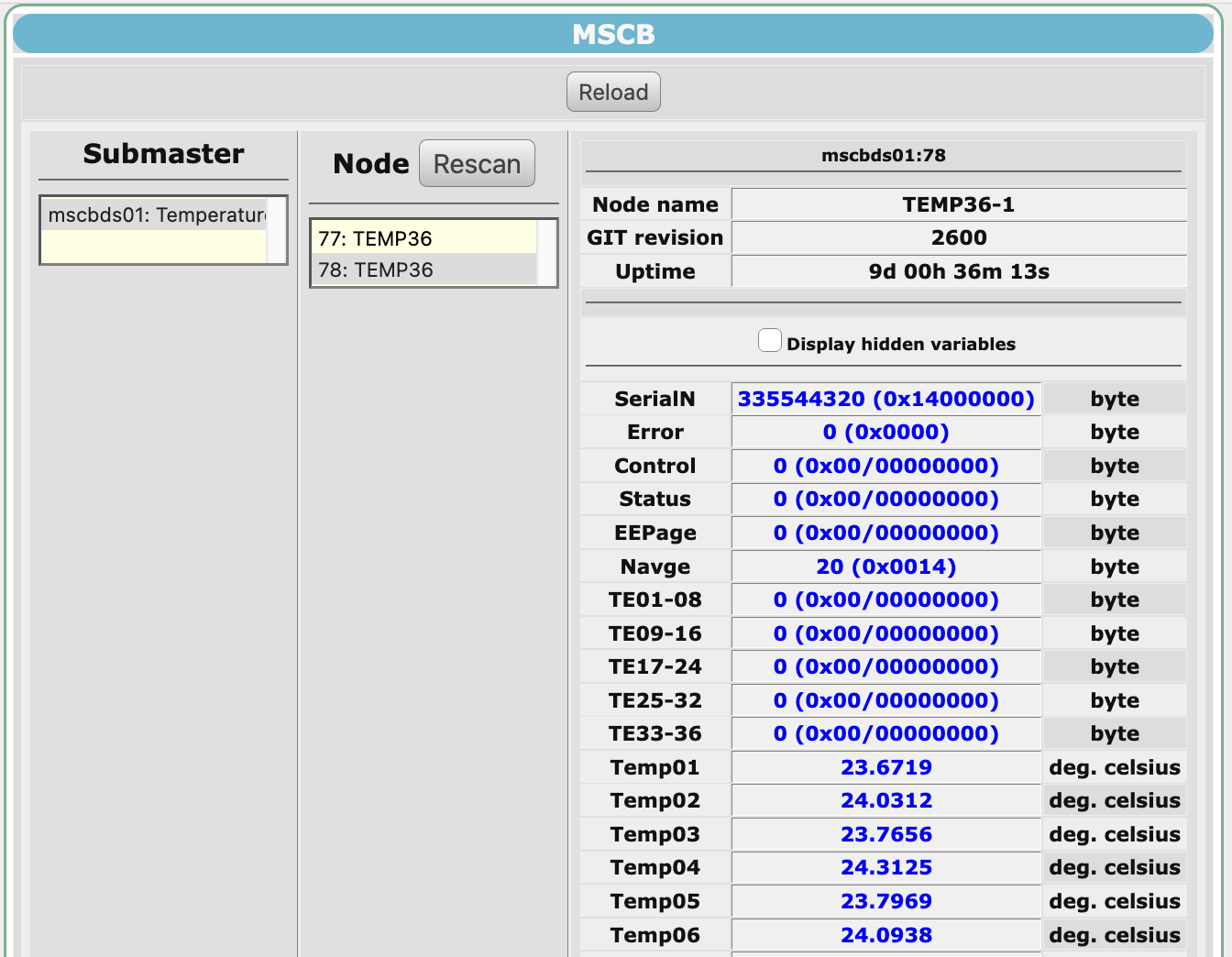 The
The MSCB page of the midas web interface shows and changes the variables of any node. Choose a submaster, then a node, to see its variables.
mhttpd talks to the submasters itself. No frontend or other program needs to be running, so this is the simplest way to use MSCB if you only need to look at the device data occasionally. The values aren't recorded, though: use a frontend for that.
The submasters are listed in /MSCB/Submaster. mhttpd fills this list from the MSCB devices used by your slow control frontends. To add a submaster yourself, create a subdirectory of /MSCB/Submaster named after the hostname or IP address of the submaster, then select it on the page and press Rescan.
In a slow control frontend
Use a frontend to record the values in the history and the data files, to raise alarms, and to show the values on the equipment page. Midas has MSCB drivers for both slow control frameworks:
- in the mdev framework, the
mdev_mscbdriver. See Writing an mdev frontend, and its ODB settings - in the class driver framework, the
mscbdevdevice driver, with any class driver. Themdevice_mscbclass sets up its channels from the frontend code. See Setting up devices in code (mdevice)
A normal frontend can also talk to MSCB devices directly, with the C++ or Python libraries. This is the way to use MSCB from a Python frontend, as the slow control frameworks only support C++.
From your own code
Programs can talk to MSCB devices with:
- C++: the
midas::mscbclass inmscbxx.h. Each object is one node. Errors throw an exception - C: the
mscb_*functions inmscb.h, e.g.mscb_init(),mscb_read()andmscb_write() - Python: the
mscbmodule in$MIDASSYS/mscb/python/mscb.py. It has the samemscb_*functions as the C library, and a simplerMSCBclass
Using MSCB from Python
The Python module is written in pure Python, so you don't need to build anything, and it doesn't need midas. You can use it:
- in standalone scripts
- in a Python frontend, e.g. to read the devices in a periodic equipment
- in a PySequencer script.
$MIDASSYS/python/examples/pysequencer_mscb_read.pyis an example that shows all the variables of one node
The module isn't part of the midas Python package, so add $MIDASSYS/mscb/python to your PYTHONPATH. For a frontend or the PySequencer, set it in the environment that the program is started from. There are more examples in $MIDASSYS/mscb/examples.
These examples read and write the variables of one node:
#include <iostream>
#include "mscbxx.h"

int main() {
   // Connect to node 10 on submaster mscb123
   midas::mscb node("mscb123", 10);

   // Read all the variables of the node, and print one by name
   node.read_range();
   std::cout << node["In0"] << std::endl;

   // Write a value to variable 5
   node[5] = 1.234;

   return 0;
}
To build it, link the midas::mscb library:
cmake_minimum_required(VERSION 3.14)
project(read_node)
find_package(Midas REQUIRED PATHS $ENV{MIDASSYS})
add_executable(read_node read_node.cxx)
target_link_libraries(read_node midas::mscb)
#include <cstdio>
#include "mscb.h"

int main() {
   // Connect to submaster mscb123
   char device[] = "mscb123";
   int fd = mscb_init(device, sizeof(device), "", 0);
   if (fd < 0) {
      printf("Cannot connect to the submaster: error %d\n", fd);
      return 1;
   }

   // Get the name and size of variable 0 of node 10
   MSCB_INFO_VAR info;
   if (mscb_info_variable(fd, 10, 0, &info) == MSCB_SUCCESS) {
      printf("Variable 0 is \"%.16s\", %d bytes\n", info.name, info.width);
   }

   // Read variable 0 of node 10, a 4-byte float
   float value;
   int size = sizeof(value);
   if (mscb_read(fd, 10, 0, &value, &size) == MSCB_SUCCESS) {
      printf("%f\n", value);
   }

   // Write 1.234 to variable 5 of node 10
   value = 1.234;
   mscb_write(fd, 10, 5, &value, sizeof(value));

   mscb_exit(fd);
   return 0;
}
The mscb_* functions return a status code (MSCB_SUCCESS if they worked) instead of throwing exceptions. They convert values to the byte order of your computer, so you can read and write them directly as float, int etc.
To build it, link the midas::mscb library:
cmake_minimum_required(VERSION 3.14)
project(read_node)
find_package(Midas REQUIRED PATHS $ENV{MIDASSYS})
add_executable(read_node read_node.cxx)
target_link_libraries(read_node midas::mscb)
import struct
import mscb

# Connect to submaster mscb123
with mscb.MSCB("mscb123") as bus:
    # Read variable 0 of node 10, a 4-byte float
    value = struct.unpack("<f", bus.read(10, 0))[0]
    print(value)

    # Write 1.234 to variable 5 of node 10
    bus.write(10, 5, struct.pack("<f", 1.234))
The MSCB class reads and writes the raw bytes of a variable. It converts them to/from little-endian byte order for you, so pack and unpack them with struct, using < for little-endian. To find the type of each variable, use mscb_info_variable(), as in the low-level example.
import ctypes
import mscb

# Connect to submaster mscb123
fd = mscb.mscb_init("mscb123")
if fd < 0:
    raise RuntimeError(f"Cannot connect to the submaster: error {fd}")

try:
    # Get the name and size of variable 0 of node 10
    info = mscb.MSCB_INFO_VAR()
    if mscb.mscb_info_variable(fd, 10, 0, ctypes.byref(info)) == mscb.MSCB_SUCCESS:
        print(f'Variable 0 is "{info.name.decode()}", {info.width} bytes')

    # Read variable 0 of node 10, a 4-byte float
    value = ctypes.c_float()
    size = ctypes.c_int(ctypes.sizeof(value))
    if mscb.mscb_read(fd, 10, 0, ctypes.byref(value), ctypes.byref(size)) == mscb.MSCB_SUCCESS:
        print(value.value)

    # Write 1.234 to variable 5 of node 10
    value.value = 1.234
    mscb.mscb_write(fd, 10, 5, bytes(value), ctypes.sizeof(value))
finally:
    mscb.mscb_exit(fd)
The mscb_* functions take the same arguments as the C functions, and return a status code (MSCB_SUCCESS if they worked) instead of raising exceptions. Pass the objects they fill with ctypes.byref(). They convert values to and from little-endian byte order. This is the byte order of ctypes values on almost all computers (x86 and ARM), so you can read and write values directly as ctypes.c_float, ctypes.c_int etc. $MIDASSYS/python/examples/pysequencer_mscb_read.py uses these functions to show all the variables of a node.