ROOTANA (deprecated)
ROOTANA is deprecated
New experiments should use manalyzer instead. This page is only kept so that experiments that still use ROOTANA can refer to it.
ROOTANA's parts have been replaced by:
ROOTANA is a ROOT-based analysis package for midas. It contains:
- libMidasInterface: classes for reading and writing midas files, connecting to a running experiment, and reading the ODB (live or from the ODB dumps in midas files).
TMidasEventholds a midas event, andTMidasOnlineconnects to a running experiment - The analyzer framework (libAnalyzer): an event loop class,
TRootanaEventLoop, and classes that decode the banks of common VME and CAMAC modules. See Analyzer framework - The display framework (libAnalyzerDisplay):
TRootanaDisplay, for writing ROOT GUIs that show histograms as they are filled. See Display framework - Example programs, in
examples, and the oldanalyzer.cxx,event_dump.cxxandevent_skim.cxxprograms, inold_analyzer - libMidasServer, libNetDirectory and libXmlServer: classes for sending histograms to an external viewer, such as ROODY. These have mostly been replaced by ROOT's THttpServer (see Web displays)
Installing
- Install ROOT, and run its
thisroot.shto setROOTSYSand addroot-configto yourPATH. - Optionally, install midas and set
MIDASSYS. Without it, ROOTANA can only analyse midas files, not live data. -
Download and build ROOTANA:
git clone https://gitlab.triumf.ca/midas/rootana.git cd rootana make -
Set
ROOTANASYSto therootanadirectory.
To build without midas or without ROOT, use make NO_MIDAS=1 or make NO_ROOT=1. make dox makes the Doxygen reference documentation, in html/index.html.
What you can do depends on what's installed:
| Installed | What works |
|---|---|
| Neither ROOT nor midas | Reading and writing midas files. Only event_dump and event_skim are built |
| Only midas | Also access to live events and the live ODB. Only event_dump and event_skim are built |
| Only ROOT | Everything except access to live data. Suitable for offline analysis, e.g. on a laptop with a copy of the data files |
| ROOT and midas | Everything |
Reading the XML ODB dumps in midas files needs ROOT's XML component (xml in root-config --features).
Analyzer framework
The analyzer framework provides:
TRootanaEventLoop, which handles the event loop, reading events from midas files or from a running experiment- Classes that decode the data in common types of bank
The event loop
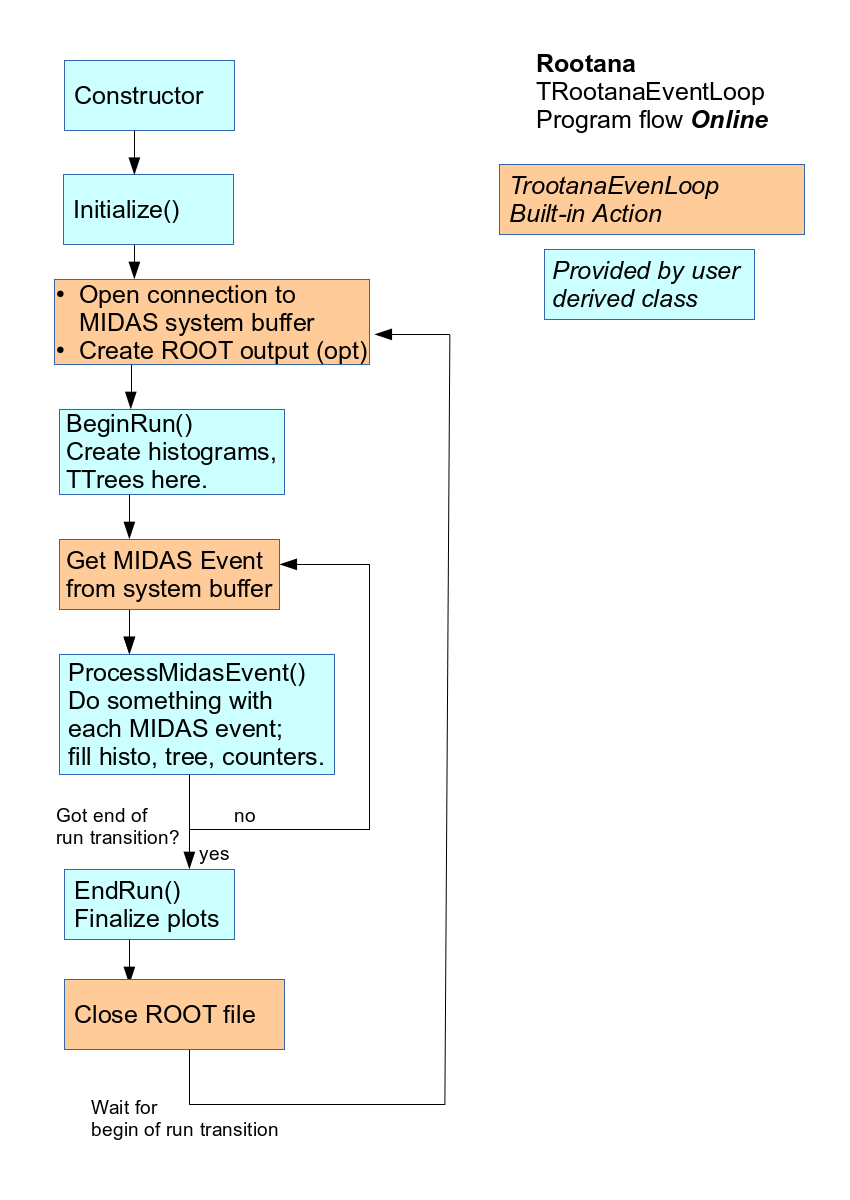
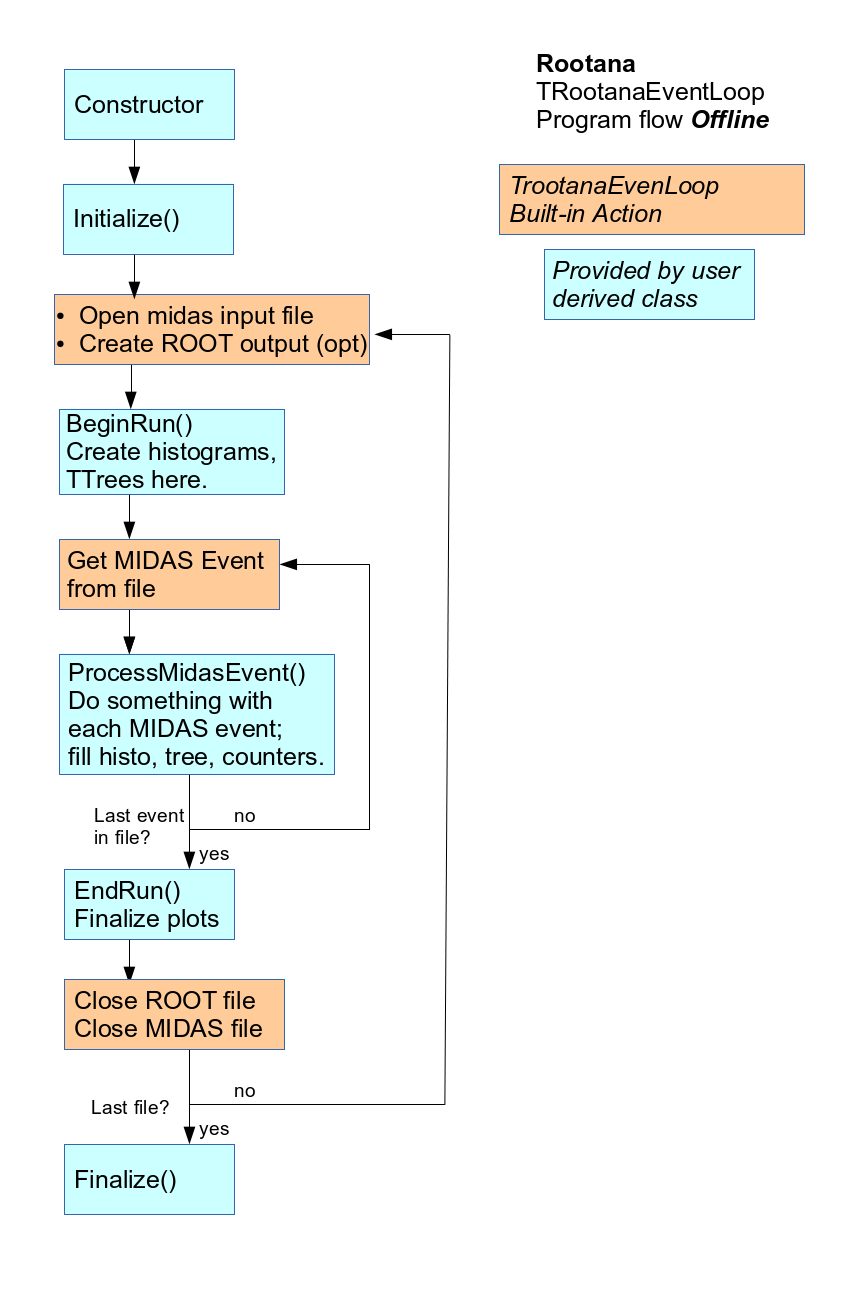
Write a class that derives from TRootanaEventLoop, and implement the methods for the start of a run, the end of a run and each event. This program prints the serial number of each event:
#include <stdio.h>
#include "TRootanaEventLoop.hxx"

class Analyzer: public TRootanaEventLoop {
public:
   Analyzer() {};
   virtual ~Analyzer() {};

   void BeginRun(int transition, int run, int time) {}

   // Print the serial number of each midas event
   bool ProcessMidasEvent(TDataContainer& dataContainer) {
      std::cout << "Event Number " << dataContainer.GetMidasEvent().GetSerialNumber() << std::endl;
      return true;
   }
};

int main(int argc, char *argv[])
{
   Analyzer::CreateSingleton<Analyzer>();
   return Analyzer::Get().ExecuteLoop(argc, argv);
}
The event loop is a singleton, so that its methods can be called from the plain functions that midas expects.
The diagrams show which steps the framework does, and which methods your class provides:
To choose which events are processed:
- Override
PreFilter(TDataContainer& dataContainer), and return false for events thatProcessMidasEvent()shouldn't see (e.g. some types of trigger) - Call
ProcessThisEventID(int eventID)to only process events with that event ID. Call it again to add more event IDs
See TRootanaEventLoop.hxx for the other methods, such as Initialize(), EndRun() and Finalize().
Histograms
By default, the analyzer opens a new ROOT file (outputNNNNN.root) at the start of each run, and makes it the current directory. New ROOT objects, e.g. those made with new TH1F(...), are created in it. At the end of the run, they are saved in the file, the file is closed, and the objects are deleted.
So create your histograms in BeginRun(), not in the constructor or in Initialize(), so that they're created after the file is opened. Delete the old histogram first:
#include <stdio.h>
#include "TRootanaEventLoop.hxx"
#include <TH1F.h>

class Analyzer: public TRootanaEventLoop {
private:
   TH1F* evtno_histo = nullptr; // histogram of the event numbers

public:
   Analyzer() {};
   virtual ~Analyzer() {};

   void BeginRun(int transition, int run, int time) {
      // Delete the old histogram, if it exists
      TH1F* old = (TH1F*) gDirectory->Get("evtno_histo");
      if (old) delete old;

      // Create the new histogram
      evtno_histo = new TH1F("evtno_histo", "Event Number Histogram", 1000, 0, 10000);
   }

   bool ProcessMidasEvent(TDataContainer& dataContainer) {
      evtno_histo->Fill(dataContainer.GetMidasEvent().GetSerialNumber());
      return true;
   }
};

int main(int argc, char *argv[])
{
   Analyzer::CreateSingleton<Analyzer>();
   return Analyzer::Get().ExecuteLoop(argc, argv);
}
To keep ROOT objects from one run to the next, create them in another ROOT directory, e.g. after gROOT->cd(). To turn off the ROOT file for each run, call DisableRootOutput(true). You can then create histograms wherever you like.
THistogramArrayBase is a base class for a set of histograms (e.g. one for each channel of a module). A derived class says how to create and fill them, which makes it easy to show them in a display.
Decoding banks
The framework has classes that decode the banks of common modules, mostly CAEN digitizers: TV792Data, TV792NData, TV1190Data, TV1720RawData, TV1730DppData, TV1730RawData, TDT724RawData, TMesytecData, TL2249Data, TCamacADCData and TTRB3Data. See each class for how its data is organised.
This example fills a histogram with the measurements in a V792 bank called ADC0:
#include <stdio.h>
#include "TRootanaEventLoop.hxx"
#include <TH1F.h>
#include <TV792Data.hxx>

class Analyzer: public TRootanaEventLoop {
private:
   TH1F* adc = nullptr; // ADC spectrum for all V792 channels in the bank

public:
   Analyzer() {};
   virtual ~Analyzer() {};

   void BeginRun(int transition, int run, int time) {
      // Delete the old histogram, if it exists
      TH1F* old = (TH1F*) gDirectory->Get("adc");
      if (old) delete old;

      // Create the new histogram
      adc = new TH1F("adc", "V792 ADC Spectrum", 4200, 0, 4200);
   }

   bool ProcessMidasEvent(TDataContainer& dataContainer) {
      // Get the decoded V792 data, by bank name
      TV792Data* data = dataContainer.GetEventData<TV792Data>("ADC0");
      if (data) {
         // Loop over all the measurements of all the channels
         std::vector<VADCMeasurement> measurements = data->GetMeasurements();
         for (unsigned int i = 0; i < measurements.size(); i++) {
            adc->Fill(measurements[i].GetMeasurement());
         }
      }
      return true;
   }
};

int main(int argc, char *argv[])
{
   Analyzer::CreateSingleton<Analyzer>();
   return Analyzer::Get().ExecuteLoop(argc, argv);
}
For a bank that has no decoder, use TGenericData to get the raw data.
Running an analyzer
Give the files to analyse on the command line, or none to connect to the experiment and analyse live data:
./ana.exe /data/run00500.mid        # analyse a file
./ana.exe                           # analyse live data
./ana.exe -r8088                    # analyse live data, with a THttpServer on port 8088
| Option | Meaning |
|---|---|
-eNNN |
Only read NNN events from the files |
-Hhostname |
Connect to the experiment on this host |
-Eexptname |
Connect to this experiment |
-bbuffer |
Read events from this event buffer |
-rPORT |
Start a ROOT THttpServer on this port (see Web displays) |
-PPORT |
Start a TNetDirectory server on this port, for ROODY (roody -Plocalhost:PORT) |
-pPORT |
Start the old midas histogram server on this port, for ROODY (roody -Hlocalhost:PORT) |
-D |
Run as a daemon |
Run the analyzer with -h to list all the options, including your own.
The example analyzer
examples contains an analyzer for common TRIUMF hardware (CAEN V792, V1190, V1720, V1730 and DT5724, CAMAC TL2249 and Agilent):
-
Copy the examples to a directory of your own, and build them, with
ROOTANASYSset:mkdir ~/analyzer cp $ROOTANASYS/examples/* ~/analyzer/ cd ~/analyzer make -
This builds a batch-mode analyzer (
ana.exe) and an analyzer with a display (anaDisplay.exe). Most of the histograms are set up inTAnaManager.hxxandTAnaManager.cxx. -
Choose the hardware in
TAnaManager.hxx, by commenting out or uncommenting its#defines, e.g.:#define USE_V792 #define USE_V1190 //#define USE_L2249 //#define USE_AGILENT //#define USE_V1720
examples/midas2root.cxx shows how to convert the data in a midas file to a TTree in a ROOT file. You decide how to store your data in the TTree.
Display framework
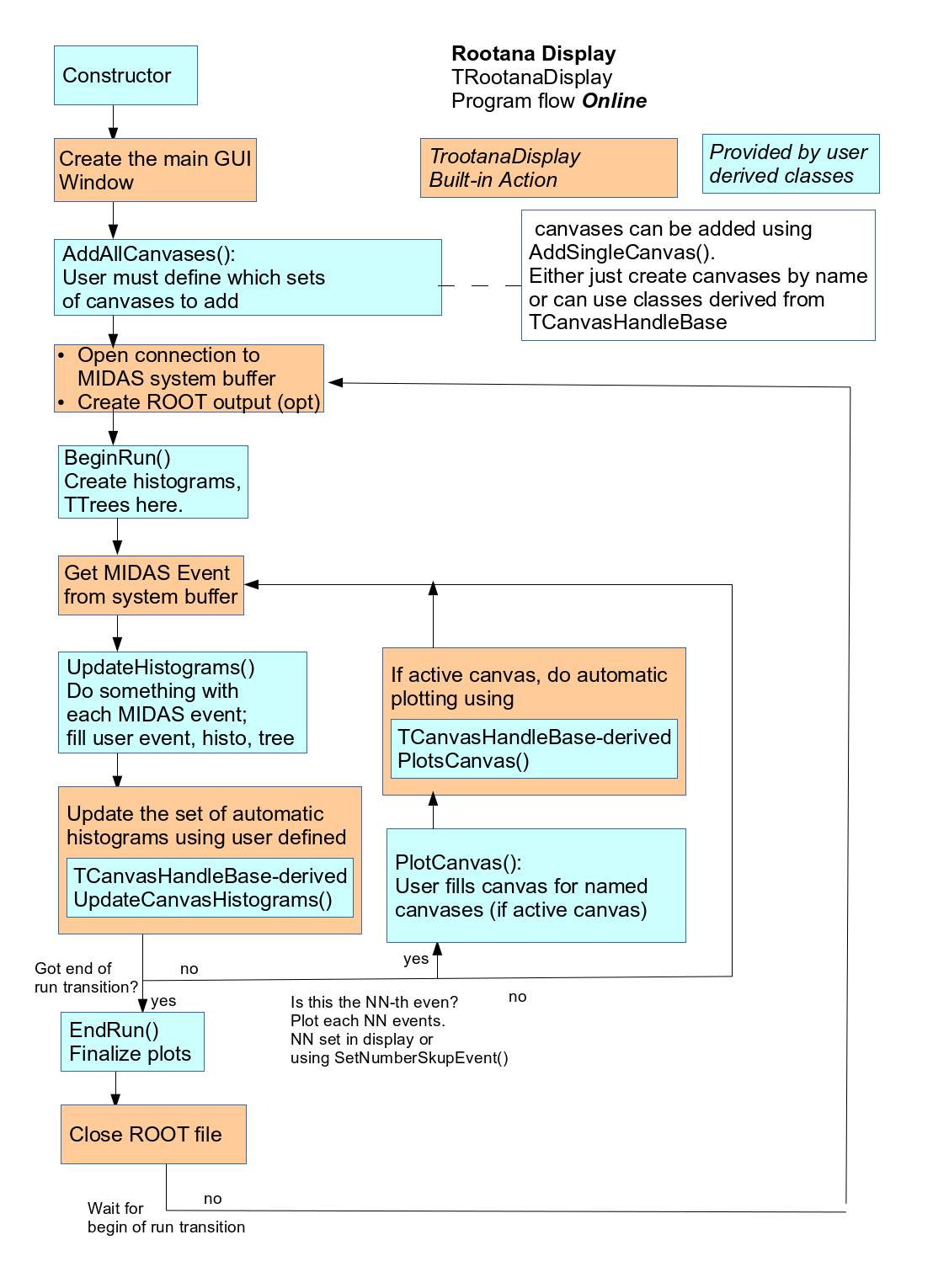
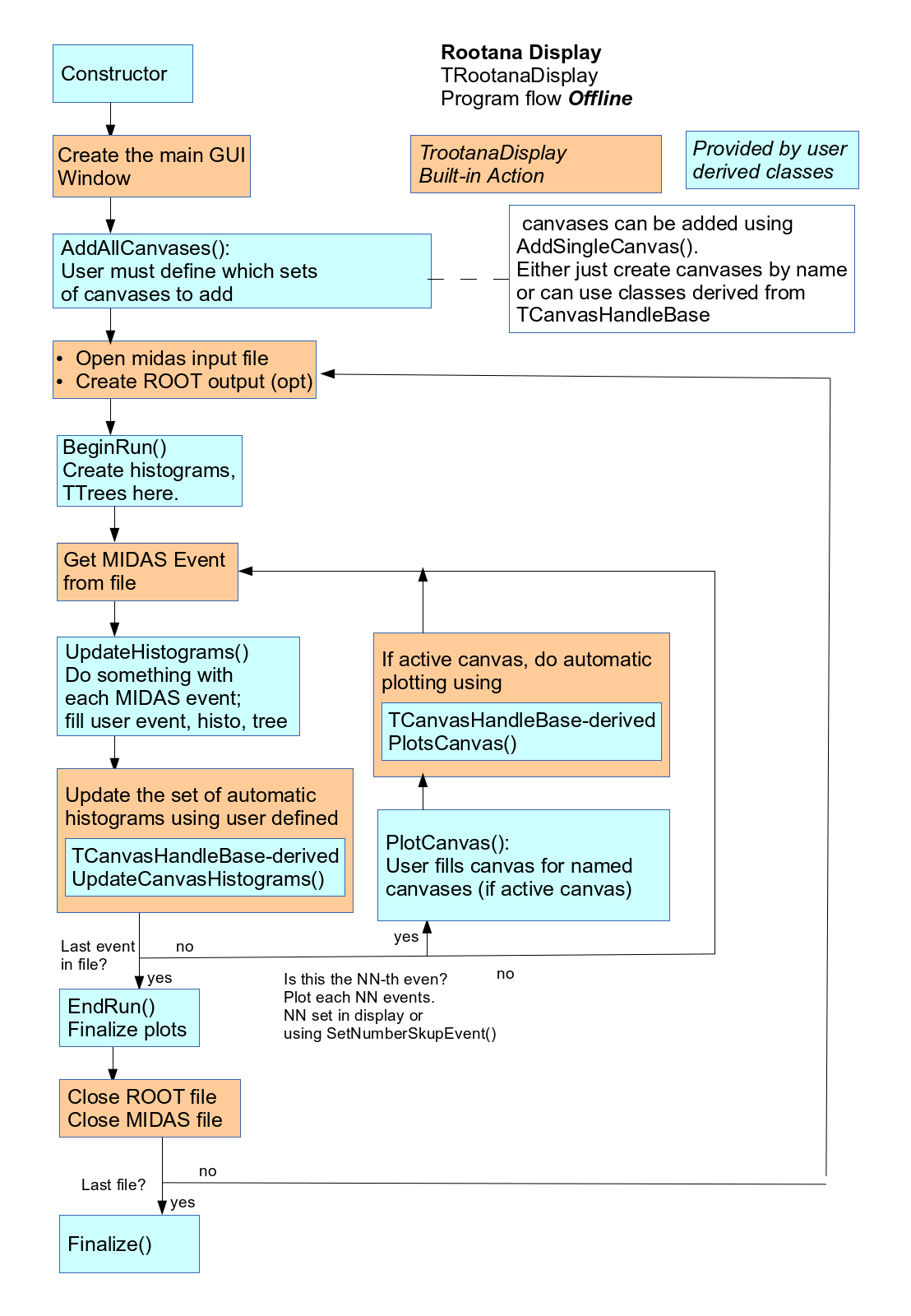
TRootanaDisplay is a base class for ROOT event displays, e.g. to show ADC or TDC spectra as they are filled. You write a class that derives from it, and implement AddAllCanvases(), which sets up the tabs of the display. In online mode, the histograms are updated for every event, and drawn every N events (set with SetNumberSkipEvent()). In offline mode, they're drawn for every event.
There are three ways to fill and draw histograms:
- Create the histograms in your display class, fill them in
UpdateHistograms(TDataContainer&), and draw them inPlotCanvas(TDataContainer&). Add their tabs withAddSingleCanvas(std::string name) - Write classes that derive from
TCanvasHandleBase, and add them withAddSingleCanvas(TCanvasHandleBase* handleClass). This is the same as the first way, but lets you put each tab's code in its own file - Create a set of histograms (a class derived from
THistogramArrayBase), and pass it toTFancyHistogramCanvas. This has more buttons to control the display, and is meant for showing the same plot for many channels
The ROOT GUI itself is a TMainDisplayWindow. Get it with GetDisplayWindow(), to find the canvas to draw on.
libAnalyzerDisplay/display_example.cxx uses all three ways, and examples/anaDisplay.cxx is a more complicated example. This display uses the first way:
#include <stdio.h>
#include <iostream>

#include "TRootanaDisplay.hxx"
#include "TH1D.h"

class MyTestLoop: public TRootanaDisplay {
   TH1F* sizeBankFR10;

public:
   MyTestLoop() {
      // Create the histograms
      sizeBankFR10 = new TH1F("sizeBankFR10", "Size of FR10 bank", 2000, 0, 10000);
   }

   void AddAllCanvases() {
      // Set up the tabs
      AddSingleCanvas("FR10");

      // Choose how many events to skip before updating
      SetNumberSkipEvent(20);

      // Choose the display name
      SetDisplayName("Example Display");
   };

   virtual ~MyTestLoop() {};

   void ResetHistograms() {
      sizeBankFR10->Reset();
   }

   void UpdateHistograms(TDataContainer& dataContainer) {
      void* ptr;
      int size = dataContainer.GetMidasData().LocateBank(NULL, "FR10", &ptr);
      sizeBankFR10->Fill(size);
   }

   void PlotCanvas(TDataContainer& dataContainer) {
      if (GetDisplayWindow()->GetCurrentTabName().compare("FR10") == 0) {
         TCanvas* c1 = GetDisplayWindow()->GetCanvas("FR10");
         c1->Clear();
         sizeBankFR10->Draw();
         c1->Modified();
         c1->Update();
      }
   }
};

int main(int argc, char *argv[])
{
   MyTestLoop::CreateSingleton<MyTestLoop>();
   return MyTestLoop::Get().ExecuteLoop(argc, argv);
}
TRootanaDisplay or ROODY?
ROOTANA can also send its histograms to the ROODY viewer, through a TNetDirectory server (-P). The differences are:
- ROODY is a second program, which shows the histograms of an analyzer that runs separately. You can restart ROODY on its own, and run it on your desktop while the analyzer runs on the midas computer, but there are two programs to keep track of
- ROODY is simpler to program, because it handles all the drawing.
TRootanaDisplayneeds some knowledge of ROOT canvases and GUIs - ROODY can only show a few ROOT classes, such as TH1 histograms. For more complicated plots (overlaid histograms, fits and labels), use
TRootanaDisplay
So for a simple set of histograms with little programming, ROODY may be better. For complicated plots, use TRootanaDisplay. A program can also do both.
Web displays
Start the analyzer with -rPORT to run a ROOT THttpServer on that port. Its web page shows the histograms with JSROOT, and it also serves the data of each histogram as JSON. To reach it through mhttpd, see JSROOT.
examples/html contains a custom page, generic_webdisplay_embed.html, that gets the histograms from the THttpServer and plots them with JSROOT, or with dygraphs (1D histograms) and plotly (2D histograms). It can:
- overlay several histograms, or show them side by side. They're fetched in one request, so they're all from the same moment (e.g. the waveforms of one event)
- reset the histograms in the analyzer (for everyone who's looking at them)
To use it:
- Set it up as a custom page, with
/Custom/Pathpointing to the directory with the page and its scripts. -
Make the THttpServer reachable at
/rootana/on the same host as mhttpd. The page asks for its data there, and the browser only allows that if it's on the same host. E.g. if mhttpd and the analyzer are behind an Apache proxy:Redirect permanent /rootana http://myhost.example.com/rootana/ ProxyPass /rootana/ http://myhost.example.com:8088/ retry=1 ProxyPass / http://myhost.example.com:8081/ retry=1 -
Say which histograms to show, in
generic_rootana_setup.jsonin the same directory as the page.
Example generic_rootana_setup.json
{
  "V792" : {
    "MaxChannels" : 32,
    "WebserverName" : "V792_0"
  },
  "V1720" : {
    "MaxChannels" : 8,
    "WebserverName" : "V1720"
  },
  "V1720 Correlations" : {
    "MaxChannels" : 8,
    "WebserverName" : "V1720_Correlations"
  },
  "V1720 Pulse Height Comparison" : {
    "WebserverName" : "V1720PHCompare"
  },
  "V1720 Comparison" : {
    "WebserverName" : {"Pulse Height Comparison" : "V1720PHCompare",
                       "Time Comparison" : "V1720TimeCompare"}
  },
  "DisplaySettings" : {
    "DisplayStyle" : "root",
    "UpdatePeriod" : 2000
  }
}
Each entry is a group of histograms that you can choose on the page:
- A single histogram (e.g. "V1720 Pulse Height Comparison"):
WebserverNameis the name of the ROOT histogram - A list of histograms (e.g. "V1720 Comparison"):
WebserverNamemaps the names to show in a drop-down menu to the names of the ROOT histograms - One histogram for each channel (e.g. "V792"): the histograms are called
<WebserverName>_0,<WebserverName>_1etc., up toMaxChannels - One histogram for each module and channel: also set
MaxModules, and the histograms are called<WebserverName>_<module>_<channel> DisplaySettings:DisplayStyle(rootorplotly) chooses one style of plot, andUpdatePeriodsets how often the plots are updated, in milliseconds
The page has two known problems:
- It's only useful while the analyzer is running online. It can't tell the analyzer to process one event at a time
- While the page is paused, you can't switch to another channel or display type, because it only has the data of the histogram it's showing
Getting help
Ask questions and report problems on the midas forum. The source code is in the ROOTANA repository.