Programs: overview
The first time you start a midas program/client, it must be done from the command-line. After that, you can start/stop programs using a web interface, or even write code to start/stop programs!
Each time a program/client connects to midas, it tells the system what its name is. This is often similar to the executable name, but doesn't have to be (e.g. the mlogger program connects using the name Logger). This name is used in messages, in the ODB structure, and on the Programs webpage.
Programs webpage
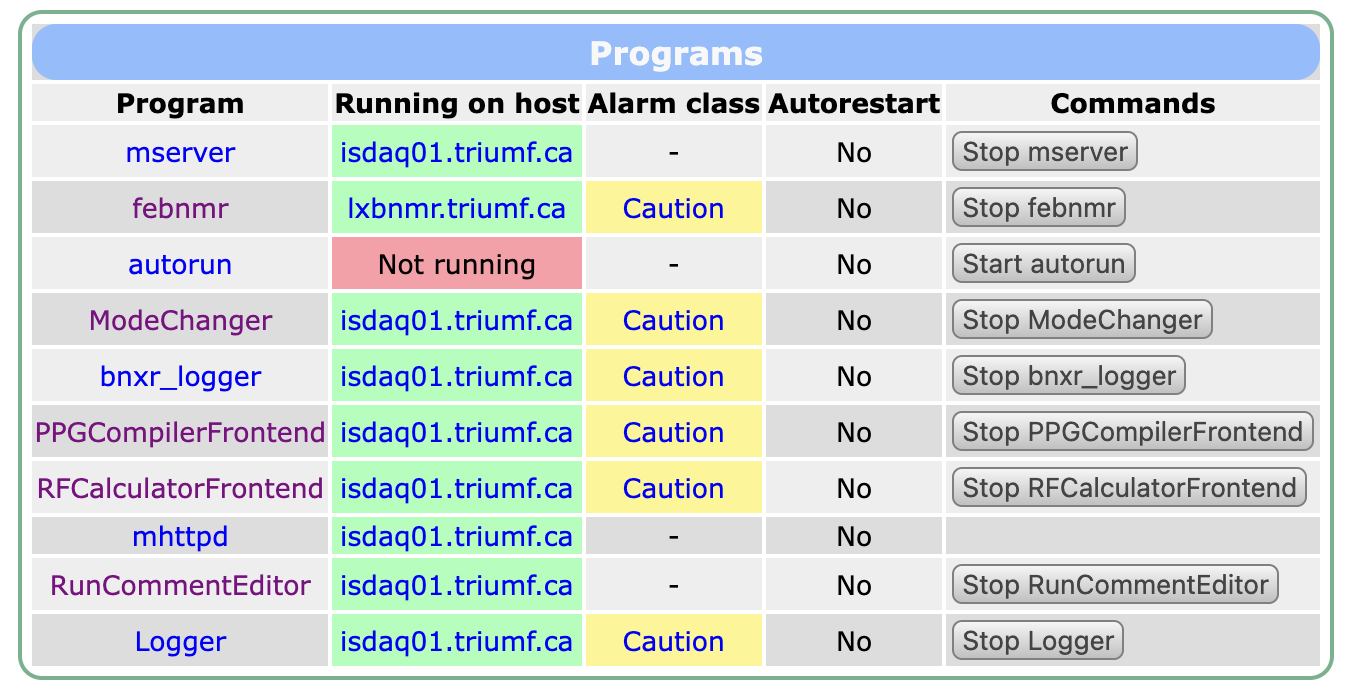 The Programs webpage shows the state of all midas programs that are running. It also shows the state of required programs, even if they are not running.
Buttons on the webpage allow you to start and stop the programs, without having to access the command-line. You may need to tweak the start command of the program for this functionality to work seamlessly.
Clicking on the name of a program takes you to that program's entry in /Programs in the ODB. Clicking on the hostname of a running program takes you to that program's entry in /System/Clients.
/System/Clients in the ODB
This section contains expert-level information
The ODB directory /System/Clients contains low-level information about the clients/programs that are connected to midas. Most users should not need to access this information directly, as webpages and programming interfaces allow you to check if a program is running or not.
The exception may be when analyzing data stored in midas files or ODB dumps, so you can check whether a client was running or not.
The directories in /System/Clients are named for the process ID (PID) of the program that is connected. For clients running on remote machines, it is the PID of the mserver instance on the main machine.
Each directory holds the client name (after any changes to make it unique), the machine the program runs on, and the run transitions it has registered for. See /System/Clients for all the keys.