Messages: overview
Midas allows programs to write textual messages to a common file. The messages may come from built-in programs or from user code, and can include both informational and error messages.
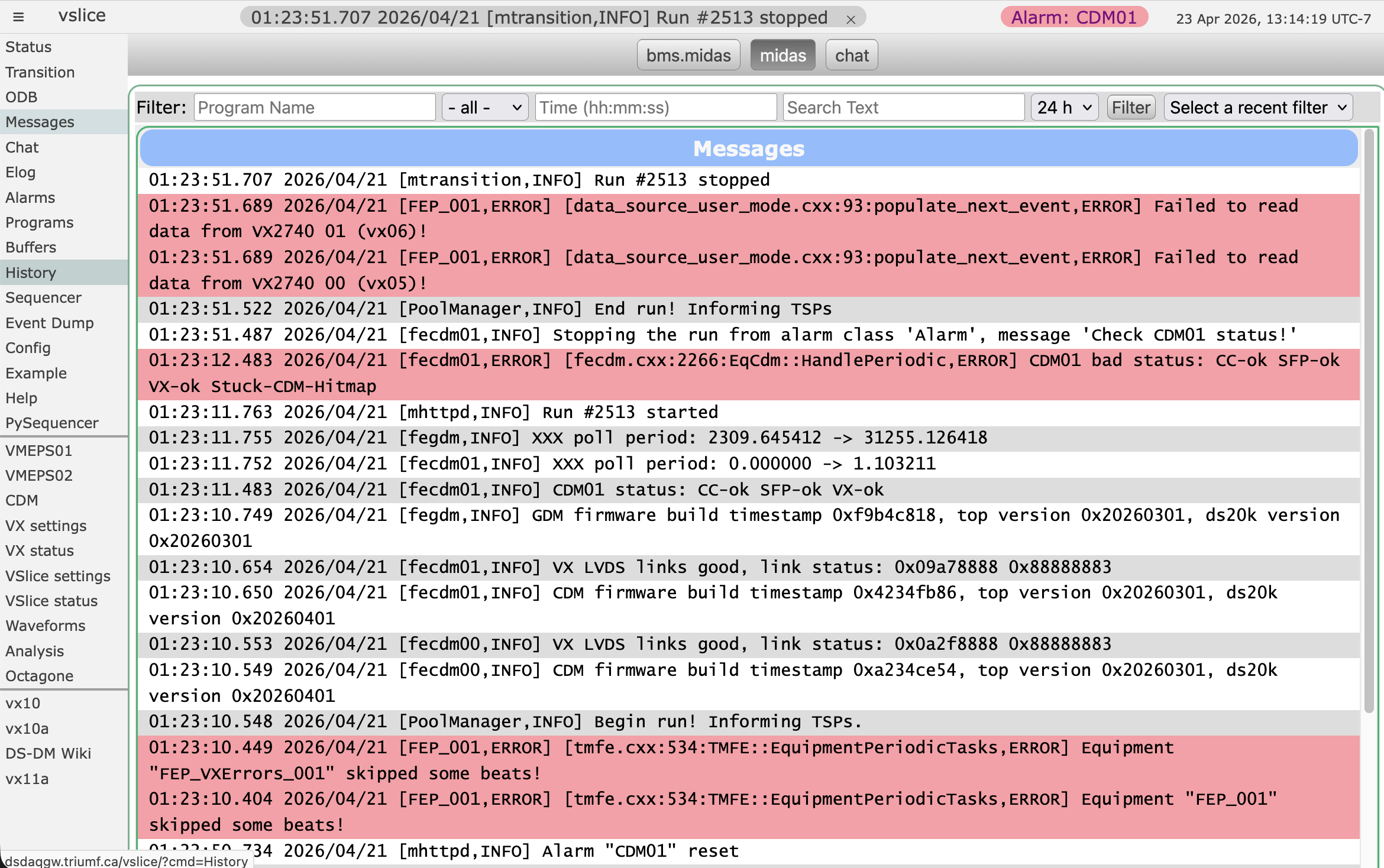 The messages are stored in plain-text files on disk, and can be accessed in multiple ways:
- viewed on the messages webpage
- queried using code
- stored as events in midas data files (though this is not commonly used)
- viewed using your favourite text editor
The midas logger (mlogger) does not need to be running for the message system to work! Clients can write directly to the relevant text files.
Messages are also written to a memory buffer (called SYSMSG), allowing other programs to be notified whenever a message is written.
Low-level details about the message system and its code interfaces can be found in Messages: programming.
Facilities
By default, messages are written to midas.log. However, you may want to separate some messages into different files (either because they're really important, really unimportant, or just to keep things organised). For example, messages from the sequencers are written to sequencer.log and pysequencer.log.
These different names are referred to as "facilities". In the above cases, the facilities are midas, sequencer and pysequencer. User code is welcome to write to either the main midas facility or make their own.
No preparation is required to use a new facility - as soon as the message system sees a message for a facility that doesn't exist, it will automatically create the necessary log file.
The web interface provides tabs for switching between which log file / facility is shown.

Log levels
The code that sends messages generally declares them as either info or error messages, though other more specialised types also exist.
| Message type | Written to log file | Written to memory buffer | Notes |
|---|---|---|---|
| Error |  |
|
Highlighted in red on webpage |
| Info | |
|
|
| Debug | |
||
| User | |
|
Was generated interactively (e.g. odbedit's msg and chat commands) |
| Log | |
||
| Talk | |
|
Also goes through speech synthesis and "spoken" through webpages |
| Call | |
|
Historically the user's analog telephone was actually called! |
File locations
There are multiple ways to specify where the log files get written, depending on if you're using the standard midas logger (mlogger), and if you want your midas data files to be in a different directory to your message log files.
In order of precedence:
/Logger/Message dir, if the ODB key exists and isn't empty/Logger/Data dir, if the ODB key exists and isn't empty- The environment variable
$MIDAS_DIRif it is defined - The experiment directory defined in the exptab file
Writing messages to data files
By default, messages are only written to the memory buffer and/or text-based log files. It is possible to also log them to the midas data files, using the ODB key /Logger/Channels/xxx/Settings/Log messages.
This accepts a bitmask, which allows you to specify which types of messages should be written. See the mlogger documentation for more details.